SharePoint Intranet · UAE
SharePoint intranet portals that employees use and Copilot can draw on
The intranet is where your policies, news and know-how should live. Built properly, it also becomes the source that Microsoft Copilot and SharePoint agents answer from. IT Enablers Global plans the structure, tidies up access, applies your brand and builds the intranet on SharePoint Online, then helps your communications team publish faster with AI.
10+ years of SharePoint delivery · Portals for small, medium and large enterprises · English and Arabic sites
What your intranet delivers
- A governed home for company news, policies and people
- Staff questions answered from your own policies by a SharePoint agent
- Pages and news drafted with Copilot, approved by your editors
- Available inside Microsoft Teams and on every phone
Intranet Purpose
Why organizations build their intranet on SharePoint
Most organizations already own SharePoint through Microsoft 365. Putting the intranet there means news, documents, Teams and Copilot all draw on the same content, under the same permissions, rather than on a separate portal that drifts out of date.
Engagement and culture
- Leadership messages that reach every location
- Recognition, events and internal social features
- Help direct company culture along with the organization's values
Productivity and access
- One source of the truth for forms, policies and procedures
- Answers in plain language instead of a hunt through folders
- Access from a laptop, from Teams or from a phone
Governance and sustainability
- Each page has a named owner and a review cycle
- Confidential HR and finance content kept to its audience
- Reduce paper and go green
New in 2026
What AI now adds to a SharePoint intranet
Microsoft has built Copilot and agents directly into SharePoint and Teams. On an intranet that is well organized, these features change how quickly employees find answers and how quickly communicators publish.
An agent for your policies
We set up SharePoint agents scoped to the HR, IT or finance policy library and share them into Teams chats. Staff ask how many days of leave carry over or how to claim travel, and the agent answers from your own documents, with each person's permissions respected.
News and pages drafted with Copilot
Copilot in SharePoint drafts and rewrites page and news content, and can turn an existing Word, PowerPoint or PDF file into a page. Nothing is published automatically: your editors review and approve every draft.
Questions instead of searches
With Microsoft 365 Copilot, employees ask in natural language and get an answer drawn from the intranet content they are allowed to open, with the source files cited so they can check.
The intranet inside Teams
The SharePoint app in Teams, formerly Viva Connections, brings intranet news, a dashboard and key resources into Teams. People with a Copilot license also get a Copilot summary of the news.
Brand applied once
The SharePoint brand center holds your colors, fonts and themes in one place, so every department site carries the same identity without custom code on each one.
English and Arabic
SharePoint supports Arabic with a right-to-left layout, and multilingual communication sites show each employee the page version in their preferred language, translated and kept current by your editors.
These AI features are licensed per user through Microsoft 365 Copilot or charged by usage. Before anything is purchased, we map which of them your current plan already covers.
What's included in an intranet engagement
- Structure: a home site, hubs and department sites mapped to how your organization is run
- Brand: themes, fonts and page templates set up in the brand center
- Content: news, events, a policy library and a people directory
- Audiences: permissions and targeting so each group sees what applies to it
- AI: SharePoint agents for policy questions and Copilot for authors
- Reach: the intranet in Teams and on mobile, plus extranet sites for partners
- Handover: editor training and a written governance guide
Groundwork First
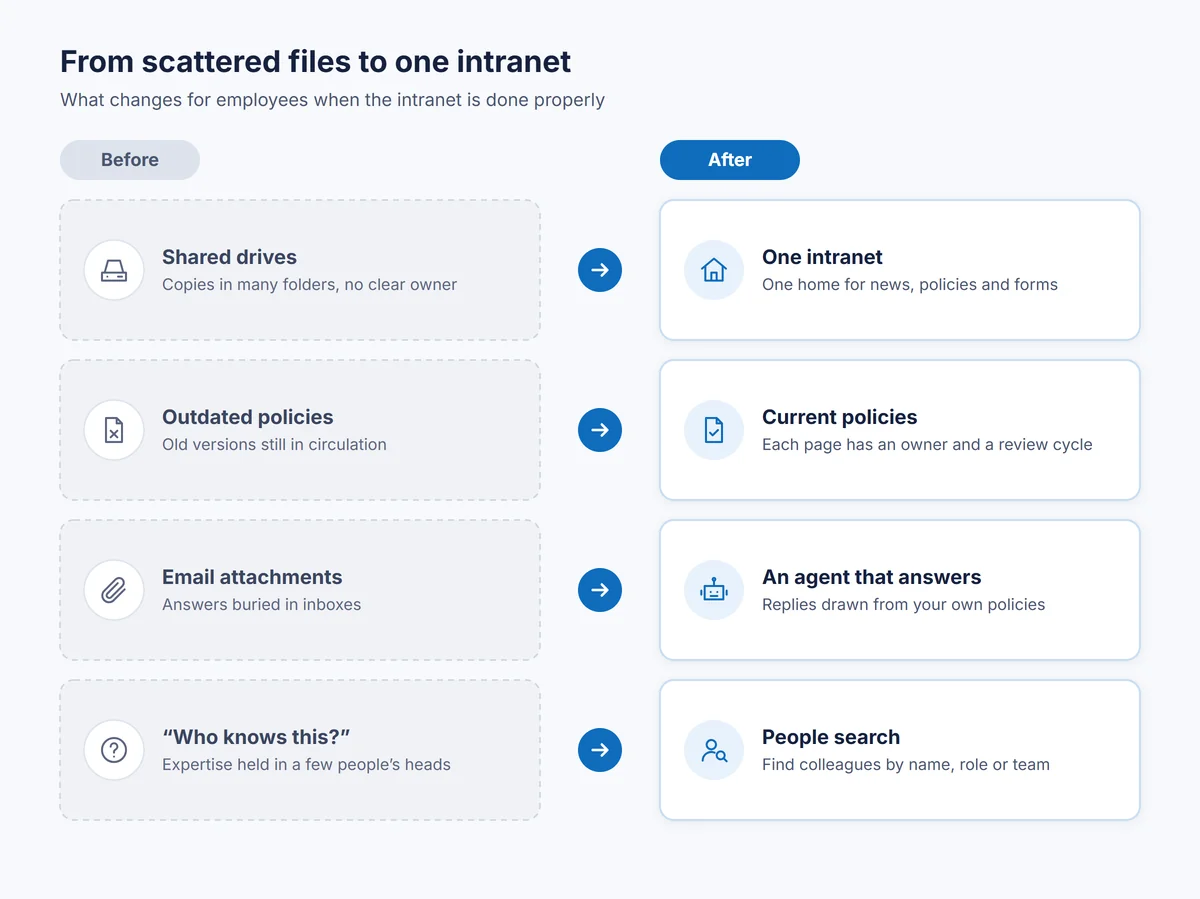
AI repeats whatever the intranet holds
Copilot and agents answer from the content a person can open. If a superseded leave policy is still published, or a salary file sits on a site shared with everyone, AI will surface it. So the groundwork comes before the launch.
Current content
Outdated pages and duplicate policies are retired or archived, and the version that remains carries an owner who keeps it accurate.
The right audience
Sites opened too widely are corrected, and areas that should stay out of Copilot results can be excluded with Restricted Content Discovery.
Protection that travels
Sensitivity labels from Microsoft Purview mark confidential HR, legal and board material, and Copilot honors those labels when it responds.
Business Impact
What a SharePoint intranet returns to the organization
Communication
- Fewer all-staff emails and repeat meetings
- Every branch and site office reading the same announcements
- Announcements published sooner with Copilot drafts
Knowledge and clarity
- Routine HR and IT questions answered without a ticket
- New joiners find what they need from their first day
- Know-how stays when experienced people move on
Confidence in AI
- Copilot answers grounded in approved, current content
- Sensitive material kept to the people entitled to it
- A brand and voice that stay consistent on every site
Frequently asked questions
Do we need Microsoft 365 Copilot licenses for an AI-ready intranet?
Not for the intranet itself, which runs on the SharePoint Online that comes with your Microsoft 365 subscription. Copilot drafting and answers across the whole intranet require a Copilot license for each user who needs them, while SharePoint agents can be charged on a metered basis for staff without one. We recommend a mix that suits how your staff actually work.
Can the intranet run in both English and Arabic?
Yes. SharePoint supports Arabic with a right-to-left layout, and multilingual communication sites let each page and news post have an Arabic version. Translations are prepared by your editors, so we plan the publishing workflow with that in mind.
Could a SharePoint agent show employees something they should not see?
Agents draw solely on files and pages the employee could already open. The risk lies in sites shared too broadly, which is why we review and correct access before agents go live.
Can partners and clients use the same platform?
Yes. We build extranet sites for partners and clients with guest access that you control and that can expire, kept separate from your internal intranet.
Our current intranet is dated. Must we rebuild from scratch?
Not necessarily. We assess what you have, keep the content that is still valid, move it to modern SharePoint sites and retire the rest, so the new intranet launches with current material only.
Ready to get started?
Tell us about your organization and we will recommend the right approach.
Prefer email? info@itenablersglobal.com