Document Management · SharePoint Online
Document management systems on SharePoint, with AI that reads your documents
A document management system organizes, secures, tracks, approves and retains your organization's documents. On SharePoint Online it can now also read them: extracting the key fields from contracts and invoices, assembling standard documents from templates and answering questions from a whole library. IT Enablers Global designs and builds it, from a single department to an enterprise-wide rollout.
10+ years of SharePoint delivery · Template-based rollout across departments
What your DMS includes
- Metadata, versioning and check-out on every controlled file
- Approval workflows from first draft to final sign-off
- Retention and sensitivity labels applied by rule
- Key fields pulled from documents automatically by AI
- Secure sharing with external parties, under your control
Purpose & Benefits
Why organizations move to a document management system
Records spread across shared drives, inboxes and personal folders are hard to secure, hard to audit and invisible to AI. A SharePoint-based DMS brings them under one set of rules, and that same structure is what lets Copilot and agents work with them safely.
Compliance and governance
- Comply with regulators
- Facilitate audits and track compliance
- Keep or dispose of records on a defined schedule
Security and best practice
- Secure organization records
- Control access at department and document level
- Confidential files labeled so protection follows them
Efficiency and cost
- Reduce paper and go green
- Less manual filing and retyping of document details
- The right version found in seconds, not hours
AI Document Processing
Documents that file, draft and explain themselves
Microsoft's document processing services and Copilot add a layer of AI on top of the library. These are the capabilities we design into a DMS, matched to the documents your organization handles most.
Columns that fill themselves
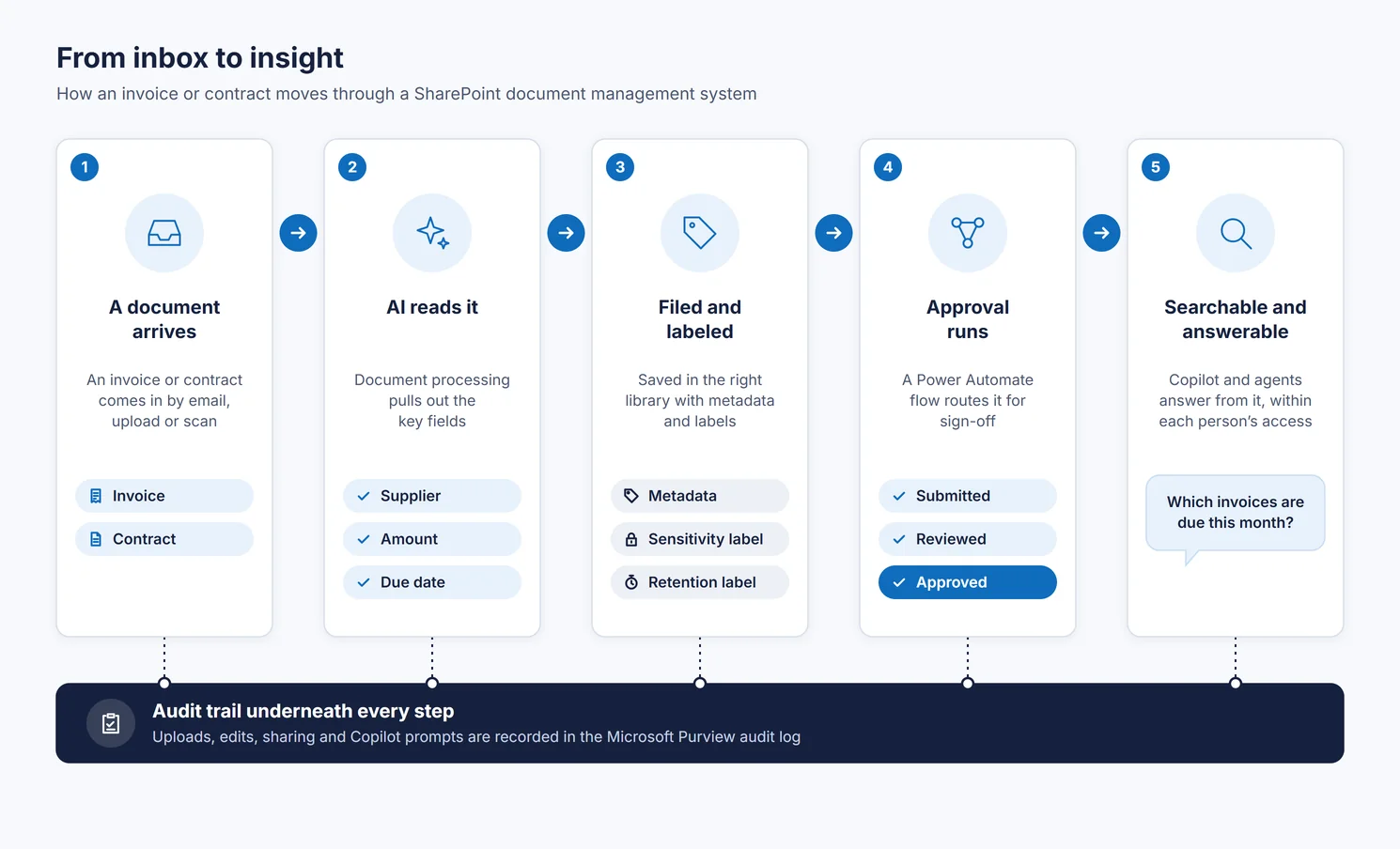
Autofill columns use a large language model to read each uploaded file and record its details, such as counterparty, contract value or expiry date, as metadata you can sort, filter and report on.
Invoices, receipts and contracts read for you
Prebuilt models handle common document types, custom models learn your own forms, and OCR reads printed or handwritten text from scans, so paper archives become searchable records.
Standard documents generated
Content assembly produces repetitive documents such as contracts, statements of work and letters from your approved templates, filled from list data instead of copied and pasted.
Signatures without leaving Microsoft 365
SharePoint eSignature sends a document for signing while the file itself stays inside your Microsoft 365 tenant, and the signed copy returns to the library.
Translated copies, formatting intact
Document translation creates a translated version in the same library, for example from English into Arabic, and keeps the original layout.
An agent on the contract library
A SharePoint agent scoped to your contracts lets legal and procurement ask which agreements renew next quarter or what a notice period is, and answers only from files the person asking is permitted to open.
Document processing services are billed pay-as-you-go through an Azure subscription; agents need a Copilot license per user or metered agent billing. We estimate your document volumes first, so the running cost is known before you switch anything on.
What's included in a DMS engagement
- A library design based on your record types, with metadata for fast, accurate retrieval
- A template-based Document Center site for each department, with unique access control
- Versioning with full revision history, plus check-in and check-out to prevent editing conflicts
- Document approval workflows in Power Automate
- Retention and sensitivity labels from Microsoft Purview
- E-Room: document sharing with external users, with guest access that expires
- Migration from file servers, older SharePoint versions and other cloud drives
Safe for Copilot
Records that stay protected when AI reads them
Copilot works within the access each person already has. A properly governed DMS makes sure that access, and the rules attached to each file, are the ones you intended.
Labels Copilot respects
Encrypted files are only used by Copilot for people with the rights to view and extract them, and a data loss prevention policy can keep labeled files out of Copilot responses altogether.
Oversharing found and fixed
Data access governance reports show libraries shared through broad links or open to the whole company, and site access reviews send each finding to the owner to resolve.
A trail for the auditor
The Purview audit log records file activity, and also Copilot prompts and responses with the files they referenced, so you can answer how a piece of information was used.
Business Impact
What a modern DMS changes for the organization
Faster cycles
Contracts and approvals move through defined steps, and standard documents are generated rather than drafted from scratch each time.
Lower risk
Renewal dates and obligations are visible as data, confidential records stay with their audience, and every action leaves evidence.
Knowledge put to work
Years of documents become a source Copilot and agents can answer from, instead of an archive nobody searches.
Frequently asked questions
Can the system read scanned and handwritten documents?
Yes. Microsoft's OCR service reads printed and handwritten text from images and scans, so older paper records can be found by their content and processed like any other file.
How is AI document processing paid for?
Microsoft bills its document processing services pay-as-you-go through your Azure subscription, based on usage. Copilot features and agents need Microsoft 365 Copilot licenses or pay-as-you-go billing. We size the volumes during design so the running cost is clear in advance.
Will Copilot expose our confidential contracts?
Copilot only uses content the person asking can already open, and it respects sensitivity labels. We correct overshared libraries, label confidential material and, where needed, add a data loss prevention policy that keeps labeled files out of Copilot responses.
Our files are on a file server and in Google Drive. Can you bring them across?
Yes. Migration Manager, Microsoft's own tool, handles file shares and cloud drives such as Box, Egnyte, Dropbox and Google Drive, while older SharePoint Server content moves with the SharePoint Migration Tool. We restructure folders into libraries and apply metadata during the move.
Can we start with one department?
Yes. Many organizations begin with legal, finance or HR, then roll the same Document Center template out to other departments with their own access control.
Ready to get started?
Tell us about your organization and we will recommend the right approach.
Prefer email? info@itenablersglobal.com