Microsoft SharePoint Online · UAE
Microsoft SharePoint Online services in the UAE, ready for Copilot and agents
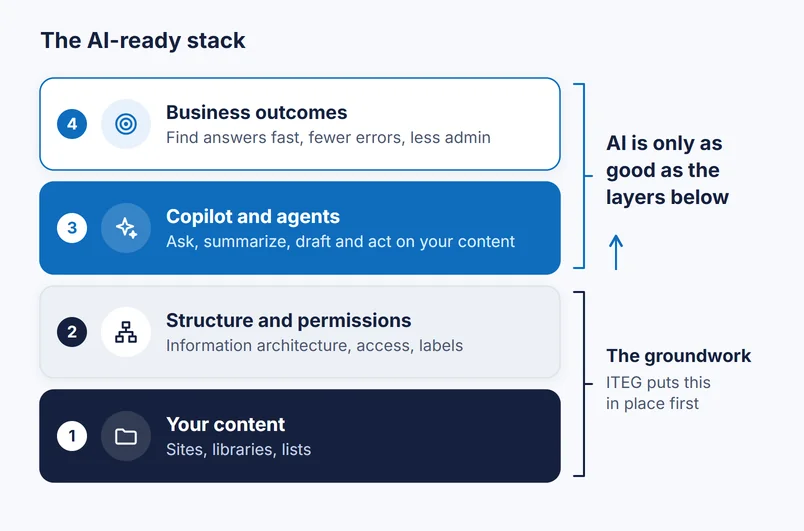
SharePoint is where your organization's knowledge lives: policies, contracts, project files and company news. Copilot and agents can only be as useful, and as safe, as the content and permissions beneath them. IT Enablers Global does that groundwork first, then builds the intranet, document management, automation and SharePoint agents on top.
Intranets · Document management · Automation · SharePoint agents · 10+ years of SharePoint delivery
What Is Possible Now
SharePoint has become the knowledge layer for Microsoft AI
Over the past two years Microsoft has built Copilot, agents and document AI into SharePoint itself. For an organization with well-kept content, that opens up work that used to need a person or a custom project.
Agents that answer from your own content
Every SharePoint site and library now comes with a ready-made agent, and custom agents can be scoped to the HR handbook, the procurement policy or a contract library, then shared into Teams chats.
Copilot that finds the right file
With Microsoft 365 Copilot, a question such as "what did we agree with the Riyadh contractor on payment terms" returns an answer with the source documents cited, drawn only from files the person can open.
Documents that describe themselves
Autofill columns and document processing models read invoices, contracts and forms as they arrive and record their key details as metadata, ready for filtering, reporting and workflows.
Pages and sites created by asking
Copilot in SharePoint, rolling out to tenants since late September 2026, drafts pages and news, and creates lists, libraries and sites from your existing content on request.
Workflows described in a sentence
Copilot in Power Automate turns a plain-language description of an approval or a notification into a working flow, which our consultants then review, harden and document.
Custom apps on SharePoint storage
SharePoint Embedded lets a custom application keep its files inside your own Microsoft 365 tenant, under your Purview controls, where Copilot and agents can also reach them.
Most of these features are licensed through Microsoft 365 Copilot, Copilot Credits or metered Azure billing. We set out what each option includes for your plan before you commit.
The groundwork that makes AI safe and useful
Copilot never grants new access, but it does make existing access easy to use. Years of "share with everyone" links and orphaned sites become a problem the day it is switched on. Our advisory work fixes that first.
- Information architecture: hubs, sites and libraries that mirror your departments, projects and record types
- Permission cleanup: data access governance reports and site access reviews to find and close oversharing
- Discovery controls: Restricted Content Discovery and Restricted Access Control for sites that need extra care
- Labels and retention: Purview sensitivity and retention labels on the content that matters
- Lifecycle: owner and inactive-site policies so the estate stays clean after go-live
Our SharePoint Services
One partner from first workshop to managed support
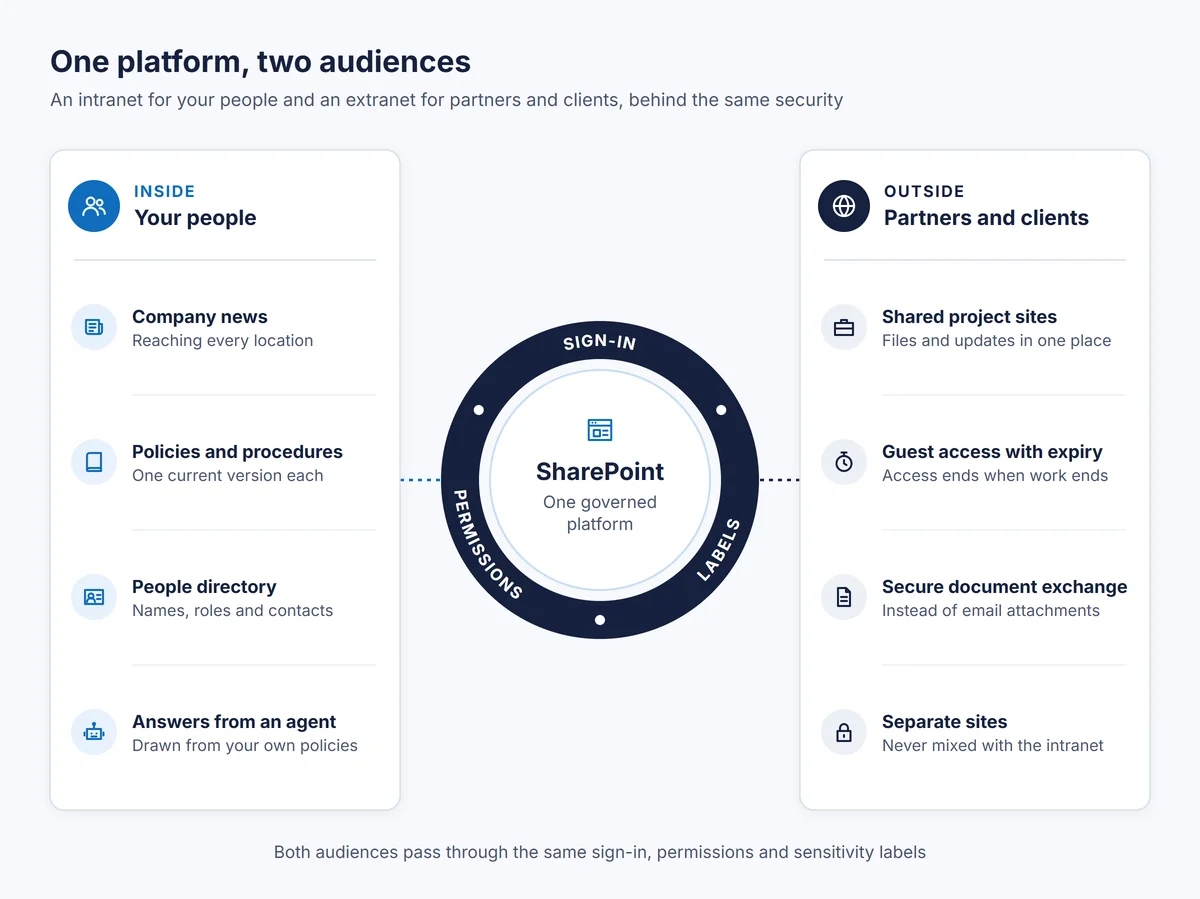
SharePoint as an intranet
A branded home for company news, policy documents and the staff directory, inside Teams and on mobile, with agents that answer staff questions from your own policies.
SharePoint as a DMS
Controlled libraries with versioning, approvals, labels and audit, plus AI that extracts key fields and generates standard documents.
Process automation
Approvals, requests and document life cycles automated in Power Automate, with AI reading the documents and agents taking the requests.
Copilot readiness and agents
An oversharing assessment, the fixes it calls for, then a staged Copilot rollout and the SharePoint and Copilot Studio agents your teams need.
Migration
Content moved from file servers, older SharePoint farms and other cloud drives with Microsoft's migration tools, restructured on the way rather than copied as it was.
Development and managed support
Custom web parts, SharePoint Embedded apps and integrations, then ongoing administration, training and a regular review of what Microsoft has changed.
How the Work Runs
Advice first, then build, then run
Why ITEG
Why organizations engage ITEG for SharePoint
Depth across every version
10+ years of implementation experience with SharePoint, from SharePoint 2003 through 2016 to Microsoft 365 SharePoint Online, so older farms and their habits hold no surprises.
Portals of every size
Consultancy and development spanning small, medium and large enterprise portals, across different industry sectors, for clients whose head offices are in the UAE or Saudi Arabia.
A single accountable partner
Consultancy, configuration, branding, development, support and training from one team, which stays on as a managed service after go-live.
Business Impact
What a well-run SharePoint estate gives back
Time recovered
Less searching, retyping and chasing approvals, because answers, metadata and routine steps are handled by Copilot, agents and flows.
AI you can approve
Leadership can sign off on Copilot knowing oversharing has been addressed, sensitive content is labeled and activity is audited.
More from licenses already paid for
SharePoint is part of most Microsoft 365 plans. Putting it to proper use often replaces separate portal, storage and workflow tools.
Frequently asked questions
What is a SharePoint agent?
An AI assistant that answers questions from a defined set of SharePoint content, such as one site or one document library. Each site and library has a ready-made agent, and custom agents can be created, named and shared in Teams. Answers only draw on files the person asking has permission to open.
Does Copilot let staff see files they should not?
No new access is granted, but Copilot makes existing access much easier to use, so anything overshared becomes easy to find. That is why we assess and fix sharing, apply labels and use Microsoft's discovery controls before a rollout.
Which licenses do we need?
SharePoint Online is part of nearly every Microsoft 365 subscription for organizations. Copilot answers across your content require a Microsoft 365 Copilot license per user; agents built in SharePoint can run on metered billing for unlicensed staff; document AI is charged by usage through Azure. Assigning Copilot licenses also gives administrators SharePoint Advanced Management features that help with oversharing.
Should we use Restricted SharePoint Search while we prepare?
It can buy time, but Microsoft describes it as a temporary measure limited to an allowed list of 100 sites. We treat it as a short bridge while permissions are fixed, not as the plan.
Do you work with organizations in Saudi Arabia?
Yes. ITEG has an office in Riyadh as well as Dubai, and delivers SharePoint and Microsoft 365 work in Saudi Arabia.
Ready to get started?
Tell us about your organization and we will recommend the right approach.
Prefer email? info@itenablersglobal.com